Tuesday, August 7, 2007

Stream AVI files on the fly!!!

I was just looking for a way to stream some files from my computer when I came across the DIVX Web Player. This piece of software is being used all across the internet to stream .divx files. It is mainly used on their site stage6.divx.com where users can upload their own videos for the world to see. If videographers do not want to upload their files to stage6, divx has nicely given a code generator to have those files streamed from your website/ftp server.

When I was playing around with this, I thought I might try to stream an avi file with it. It worked perfectly on my ftp server. I was, however, unable to make it work with just a normal file path.

It does not work with wmv files, although those stream anyways.

I am not sure if the files that work with it are only avis encoded with DivX or Xvid, but any comments would be helpful.


Divx Web Player
Divx Web Player Code Generator

Tuesday, July 10, 2007

Want some free stuff courtesy of Microsoft?

Recently, Microsoft unveiled its http://club.live.com site where users can sign up for a free Microsoft account and play games for tickets. With the tickets, the user can pick from a variety of prizes ranging from 1 song download all the way to an XBOX 360 gaming system. It's such a sweet deal from Microsoft.

Now heres where this deal gets even sweeter.

Head on over to http://livemacro.googlepages.com and download their livemacro program. This program will actually play the games for you AND it will always win. No Joke! Currently, I'm looking to win a Zune, or maybe if I have the patience the 360 package.

A word to the wise: dont use the program too often or you might get caught and Microsoft will delete all accounts associated with your IP address (even your XBOX live account!!!!!!). Just use it sparingly and you should be well on your way to an awesome prize.

Wednesday, June 27, 2007

Michael Moore is at it again.

The master of documentary deception is at it again. This time, hes attacking America's health care system. His "non-partisan" film "Sicko" hits theatres Friday (June 29). Please take the time to read this article before you blindly walk into one of Moore's webs. It notes some of the facts which Moore "conveniently" left out of the film to get his point across. Dont be ignorant. Check it out.

Tuesday, June 26, 2007

19 SFW Sites (page 1)

  • http://maps.google.com/
    As well as providing directions and traditional maps, the guys at Google are now allowing you to browse all of North America and most of Europe in their handy satellite images. With the recent addition of street level views this will assure your boss won’t see too much work come over your cube wall.

  • http://news.google.com/
    You might guess that you would find news here. It keeps true Google fashion by giving mostly text and small pictures, keeping your loading times down to a minimum and making it much harder for your boss to realize you’re catching up on how Paris is doing since her recent absence from the night club scene.

  • http://office.microsoft.com/
    Okay so this one actually will help you with you productivity. It provides a large knowledge base for the Office Suite products, but more importantly it has user submitted templates for things such as memos or binder cover slips.

  • http://power.listentoamovie.com/
    So watching movies at your cube might get the attention of your boss, but not listening to them. Once you see a movie once who needs the visual stimulation anyways? Just load the player up in the background and enjoy your movies played out in your own mind. Be careful about listening to any of the Star Wars movie, you might be severely disappointed to learn that George Lucas writes like a 6th grader.

  • http://puzzles.usatoday.com/
    If you’re office allows java scripts you can enjoy racking your brain trying to come up with a 7 letter word for uneducated.

  • http://www.accuradio.com/
    If it’s still around after July 15, it provides a wide selection of channels and variety of channels. The best part about this site is if you don’t want to hear a particular artist, or five, you can deselect them on the channel. If you already have an internet radio site you like please visit SaveNetRadio.

  • http://www.digg.com/
    You never know what you get here. It’s got everything from news reports to new programs. Be careful, it’s very possible to become a slave to digg instead of your wonderfully under skilled boss.

  • http://www.dilbert.com/
    It’s the cartoon version of your life 8-10 hours a day. Enjoy a chuckle at the ever hilarious Dilbert, Dogbert, and the crew. Or more likely curse the corporate world and its this comic for making light of your situation while this Scott Adams man gets paid to make a tiny drawing everyday.

Page 2

19 SFW Sites (page 2)

  • http://www.drudgereport.com
    • The Drudge Report is a U.S.-based news website run by Matt Drudge. The site consists primarily of links to stories from the US and international mainstream media about politics, entertainment, and current events as well as links to many popular columnists. Occasionally Drudge authors a story of his own. The Report originated around 1994 as a weekly subscriber-based email dispatch. It is most famous for being the first news source to break the Monica Lewinsky scandal to the public after Newsweek killed the story.
  • http://www.espn.com
    • ESPN.com is the official website of ESPN and a division of ESPN Inc.. Since being launched in 1995 as ESPNet.SportsZone.com, the website has developed numerous sections including: Page 2, SportsNation, ESPN 360, ESPN Motion, My ESPN, ESPN Sports Travel, ESPN Video Games, ESPN Insider, ESPN Fantasy Sports and ESPNU.com. ESPN.com also has partnerships with MLB.tv, NBA,com, WNBA.com, NHL.com, Baseball America, Golf Digest, Scouts Inc., Jayski.com, USGA.org and Masters.org.
  • http://www.google.com/ig
    • Offers a customizable homepage for google account holders. Fill it with widgets, weather, countdown, jokes, games, or anything else you can imagine.
  • http://www.lifehacker.com
    • Lifehacker is an advertising-supported weblog about life hacks and software which launched on January 31, 2005. The site is owned by Gawker Media and covers Microsoft Windows, Mac and Linux programs as well as time-saving tips and tricks. The staff updates the site about 18 times each weekday, with reduced updates on weekends. The Lifehacker motto is: “Computers make us more productive. Yeah, right. Lifehacker recommends the software downloads and web sites that actually save time. Don't live to geek; geek to live.”
  • http://www.thinkgeek.com
    • ThinkGeek is an electronic commerce company based in Fairfax, VA and a subsidiary of SourceForge, Inc.. It sells items that mostly cater to PC enthusiasts and other 'geeky' social groups. Their merchandise consists of clothing, computer hardware, toys for around the office, caffeinated drinks, and candy.
  • http://www.wikipedia.org
    • A multilingual, web-based, free content encyclopedia project. Wikipedia is written collaboratively by volunteers; the vast majority of its articles can be edited by anyone with access to the Internet

And the Nobel Prize in Chemsitry goes to....

John Kanzius, a former broadcast enginner and physicist was looking for a cure for cancer. His idea revolved around the idea of injecting gold particles into a cancer patient. The gold would be attracted to the cancerous cells and then John's machine would emit radio waves which would excite only the cancerous cells and destroy them. Sounds great, right?

Well it gets even better. A colleague was watching John's machine work and asked him if it might be used to desalinate saltwater. John put a tube of salt water into the machine and it IGNITED.

Thats right folks, the most abundant resource on earth has just been turned into a fuel, and oh yeah, John may also eventually cure cancer.

The radio waves excite the salt and eventually burn the hydrogen in the water at 1500 centigrade.

Dont believe me?

Check it out on youtube. (link)

Monday, June 25, 2007

Total Training's Photoshop CS3: Essentials

I recently got my hands on a copy of Photoshop CS3 and let me tell you, this program is incredible. Having only fiddled with earlier versions of Photoshop for only a few minutes at a time, I've been really attempting to learn some common methods of editing photos with this version. Along with Photoshop, I made my way over to TotalTraining.com and purchased their Photoshop CS3: Essentials dvd (link).

The instructor is Chad Perkins, who apparently works alot with Photoshop. He knows most of the features by heart and is a fan of Keyboard Shortcuts. If you plan on taking his course on a laptop, make sure that your keyboard has a numberpad on the side, along with a mouse that isnt the touchpad. Chad is a very enthusiastic instructor which is nice, because without some enthusiasm, it would be easy to lose interest in the subject. Once or Twice during each lesson, Chad will make a joke about himself and how he uses Photoshop to fix characteristics of himself in pictures.

The course moves at a pretty rapid pace, but you can always hit that nice pause button. If you need to exit the program, it will remember where you last were in the lesson so you dont have to try to remember the place. The course also includes many example files and .psd documents for you to follow along with, which is nice.

The only problem that Ive found with this training, is that the program that is used to view the video files is pretty RAM intensive. I just used my favorite media player VLC to browse to the videos folder and created a playlist and then watched it that way. Another problem with the training, or any video computer training, is screen size. You will want to have Photoshop maximized, but you will also want to be able to see the video that is playing. Unfortunately the text is small in the video so you have to have it pretty large. The best solution that I have found to remedy this is to have a dual monitor setup. If you dont want to disconnect your other monitor from your other pc, you can use a free program called Synergy, which uses your existing lan connection to remote control the other pc with one keyboard even if there are different operating systems involved (link).

Having almost completed the training series, I cant wait for the advanced series to come out, so I can learn more techniques. Until then, Ill just have to perfect the methods that were taught in the essentials series.

Wednesday, June 20, 2007

Windows Keyboard Shortcuts

To
Press
Set focus on a notification.
Windows Key+B
View properties for the selected item.
ALT+ENTER
Displays the properties of the selected object.
ALT+Enter
Cycle through items in the order they were opened.
ALT+ESC
"Close the active item, or quit the active program.
ALT+F4
Opens the shortcut menu for the active window.
ALT+SPACEBAR
Display the System menu for the active window.
ALT+SPACEBAR
Switch between open items.
ALT+TAB
Carry out the corresponding command or select the corresponding option in a dialog box.
ALT+Underlined letter
Display the corresponding menu.
ALT+Underlined letter in a menu name
Select a button if the active option is a group of option buttons in a dialog box.
Arrow keys
View the folder one level up in My Computer or Windows Explorer.
BACKSPACE
Open a folder one level up if a folder is selected in the Save As or Open dialog box in a dialog box.
BACKSPACE
Copy selected item.
CTRL while dragging an item
Select all.
CTRL+A
Copy.
CTRL+C
Move the insertion point to the beginning of the next paragraph.
CTRL+DOWN ARROW
Display the Start menu.
CTRL+ESC
Close the active document in programs that allow you to have multiple documents open simultaneously.
CTRL+F4
Move the insertion point to the beginning of the previous word.
CTRL+LEFT ARROW
Move the insertion point to the beginning of the next word.
CTRL+RIGHT ARROW
Create shortcut to selected item.
CTRL+SHIFT while dragging an item
Highlight a block of text.
CTRL+SHIFT with any of the arrow keys
Move backward through tabs in a dialog box.
CTRL+SHIFT+TAB
Move forward through tabs in a dialog box.
CTRL+TAB
Move the insertion point to the beginning of the previous paragraph.
CTRL+UP ARROW
Paste.
CTRL+V
Search for computers.
CTRL+Windows Key+F
Cut.
CTRL+X
Undo.
CTRL+Z
Delete.
DELETE
Display the bottom of the active window.
END
Carry out the command for the active option or button in a dialog box.
ENTER
Cancel the current task.
ESC
Display Help in a dialog box.
F1
Activate the menu bar in the active program.
F10
Rename selected item.
F2
Search for a file or folder.
F3
Display the Address bar list in My Computer or Windows Explorer.
F4
Display the items in the active list in a dialog box.
F4
Refresh the active window.
F5
Cycle through screen elements in a window or on the desktop.
F6
Display the top of the active window.
HOME
Switch MouseKeys on and off.
Left ALT +left SHIFT +NUM LOCK
Switch High Contrast on and off.
Left ALT +left SHIFT +PRINT SCREEN
Open the next menu to the left, or close a submenu.
LEFT ARROW
Collapse current selection if it's expanded, or select parent folder.
LEFT ARROW
Display the items in the active list in a dialog box.
F4
Refresh the active window.
F5
Cycle through screen elements in a window or on the desktop.
F6
Display the top of the active window.
HOME
Switch MouseKeys on and off.
Left ALT +left SHIFT +NUM LOCK
Switch High Contrast on and off.
Left ALT +left SHIFT +PRINT SCREEN
Open the next menu to the left, or close a submenu.
LEFT ARROW
Collapse current selection if it's expanded, or select parent folder.
LEFT ARROW
Display the items in the active list in a dialog box.
F4
Refresh the active window.
F5
Cycle through screen elements in a window or on the desktop.
F6
Display the top of the active window.
HOME
Switch MouseKeys on and off.
Left ALT +left SHIFT +NUM LOCK
Switch High Contrast on and off.
Left ALT +left SHIFT +PRINT SCREEN
Open the next menu to the left, or close a submenu.
LEFT ARROW
Collapse current selection if it's expanded, or select parent folder.
LEFT ARROW
Display the shortcut menu for the selected item.
Menu key
Switch ToggleKeys on and off.
NUM LOCK for five seconds
Display all subfolders under the selected folder.
NUM LOCK+ASTERISK on numeric keypad (*)
Collapse the selected folder.
NUM LOCK+MINUS SIGN on numeric keypad (-)
Display the contents of the selected folder.
NUM LOCK+PLUS SIGN on numeric keypad (+)
Open the next menu to the right, or open a submenu.
RIGHT ARROW
Display current selection if it's collapsed, or select first subfolder.
RIGHT ARROW
Switch FilterKeys on and off.
Right SHIFT for eight seconds
Display the items in the active list in a dialog box.
F4
Refresh the active window.
F5
Cycle through screen elements in a window or on the desktop.
F6
Display the top of the active window.
HOME
Switch MouseKeys on and off.
Left ALT +left SHIFT +NUM LOCK
Switch High Contrast on and off.
Left ALT +left SHIFT +PRINT SCREEN
Open the next menu to the left, or close a submenu.
LEFT ARROW
Collapse current selection if it's expanded, or select parent folder.
LEFT ARROW
Display the shortcut menu for the selected item.
Menu key
Switch ToggleKeys on and off.
NUM LOCK for five seconds
Display all subfolders under the selected folder.
NUM LOCK+ASTERISK on numeric keypad (*)
Collapse the selected folder.
NUM LOCK+MINUS SIGN on numeric keypad (-)
Display the contents of the selected folder.
NUM LOCK+PLUS SIGN on numeric keypad (+)
Open the next menu to the right, or open a submenu.
RIGHT ARROW
Display current selection if it's collapsed, or select first subfolder.
RIGHT ARROW
Switch FilterKeys on and off.
Right SHIFT for eight seconds
Switch StickyKeys on and off.
SHIFT five times
Prevent the CD from automatically playing.
SHIFT when you insert a CD into the CD-ROM drive
Select more than one item in a window or on the desktop, or select text within a document.
SHIFT with any of the arrow keys
Delete selected item permanently without placing the item in the Recycle Bin.
SHIFT+DELETE
Display the shortcut menu for the selected item.
SHIFT+F10
Move backward through options in a dialog box.
SHIFT+TAB
Select or clear the check box if the active option is a check box in a dialog box.
SPACEBAR
Move forward through options in a dialog box.
TAB
Carry out the corresponding command.
Underlined letter in a command name on an open menu
Display or hide the Start menu.
Windows Key
Lock your computer if you are connected to a network domain, or switch users if you are not connected to a network domain.
Windows Key+ L
Display the System Properties dialog box.
Windows Key+BREAK
Show the desktop.
Windows Key+D
Open My Computer.
Windows Key+E
Search for a file or folder.
Windows Key+F
Display Windows Help.
Windows Key+F1
Minimize all windows.
Windows Key+M
Open the Run dialog box.
Windows Key+R
Restores minimized windows.
Windows Key+Shift+M
Opens Utility Manager.
Windows Key+U
Original Text: http://www.microsoft.com/enable/products/KeyboardSearch_XP.aspx

Tuesday, June 19, 2007

15 Must Have FREE Programs

Heres a list of software that I have on my PC that I would not uninstall.

  1. Mozilla Firefox (link)
    • No point in explaining this one.
  2. Mozilla Thunderbird (link)
    • Mozilla's awesome email program. Offers extensions just like firefox, which makes it the best
  3. Launchy (link)
    • This program is a keystroke launcher for windows. Basically you just hit your hotkeys to bring up the launchy window, and begin typing for whatever you want to open (docs, xls, folders, websites) etc. Definitely worth a look.
  4. Pidgin formerly Gaim (link)
    • Multi-network instant messenger client. Has tons of plugins for it, so it can be as great as you want to make it.
  5. AVG Antivirus (link)
    • Incredible free antivirus program which updates and scans whenever you want it to. Will even scan emails from thunderbird.
  6. Hamachi (link)
    • Excellent virtual lan software. Here is a more complete review.
  7. Flashget (link) (with FlashGot Firefox Extension)
    • Flashget is a program which lets you speed up your downloads by opening several connections to the hosting servers. Also will let you resume downloads.
    • FlashGot is the firefox extension that enables its use in Firefox. (link)
  8. VLC Media Player (link)
    • I found VLC a while ago when I was looking for codecs for windows media player. This program plays any video file right out of the box without the need for codecs. GUI leaves a little to be desired, but there are so many options that you forget about it.
  9. Lavasoft AdAware Personal (link)
    • Spyware scanner. Seems to work well. (doesnt work well with others, though)
  10. Rainlendar2 (link)
    • Excellent calendar program which sits on your desktop. Tons of options as well.
  11. WinRAR (link)
    • Archiving program for the masses. I believe it was the first to support the RAR format. Shareware.
  12. MediaMonkey (link)
    • I hate iTunes. MediaMonkey offers a fully functional replacement for it. Will let you transfer files back to your computer from your iPod. Is compatible with any media player.
  13. CCleaner (link)
    • Cleans up your temporary file folders mainly from your internet browser. My first time running it, I cleared up 2.5 gigs. I ran it yesterday, about a week after first running it, and cleared up 100mb. Worth it.
  14. VMWare Player (link)
    • I love windows, but sometimes I find myself in need of running linux. This program emulates a pc, and will let you boot linux from within windows. Soon i'll put up a guide as to how to enable cut and paste text between a windows host and linux guest. Also will explain how to make the resolution of the window stretch, and how to enable file transferring.
  15. Logmein (link)
    • Remote control software for your pc. The viewer will run from any browser. A more robust review here.

Hamachi


A few years ago, my friends and I were looking to play some online video games on a LAN. We really didnt want to go into the massive online world because we were sure that the folks there had been playing the game since it first debuted. Obviously, it wouldnt be any fun at first to get our heads shot right out of the door. The only problem was, it was a pain in the rear to bring the router and cables over to make this LAN work. So, we looked for a software solution.

It is very rare when you download a product, install it, and have it instantly work the way you would like without any customization. Hamachi did this. Hamachi is a virtual LAN program in which you join into "rooms" that simulate lans. Each user is given his own custom IP address and you simply type that into the LAN connection section of your online game, and youre ready to go.

Not only is this great for LAN parties, but I found that it is best used for printer sharing. You simply hook up a printer to a dedicated PC, and share the printer. Then BAM! you can print to your printer anywhere that you have an internet connection.

Hamachi is also great for secure file transfers. You can simply right click the other users in the vLAN and browse their shared files if theyve given you permission rights.

Overall, Hamachi is a must have for anyone using dual PCs, especially when you dont always have access to both.


Advantages of LogMeIn Hamachi
LAN over the Internet
Arrange multiple computers into their own secure network, just as if they were connected by a physical cable.
Remote Access
Remote control any machine on your network with remote desktop.
Files and Network Drives
Access critical files and network drives.
Zero-configuration
Works without having to adjust a firewall or router.
Security
Industry-standard, strong encryption and authentication.
Cost Effective
Basic version is free to use.

Get this program. (link)

Friday, June 15, 2007

Ethernet Made Easy

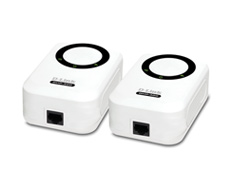
Are you getting poor wireless reception in parts of your home? Do you have a basement that just cant seem to pickup any wireless signal? Well D-Link has the solution for you. They recently released their DHP-301 PowerLine HD Ethernet Starter Kit (link).

This product provides an ethernet connection through your walls using your existing power lines. You simply plug in one of the adapters into your wall near your router and connect an ethernet cable, and the other to any outlet that you choose. Presto! Youve got an ethernet connection that can support up to 200mbps. The only issue would be the $129.99 price tag, which is pretty steep when you can just buy a wireless range extender for around $80. I guess the additional $40 is for the folks who dont have wireless at all, or are really paranoid about their wireless getting pilfered.

A few specs:
  • Speeds up to 200Mbps**.
  • Stream HD media content across your network.
  • Connect computers, game consoles, and multimedia devices to the Internet.
  • Built-in QoS engine helps prioritize audio & video streaming to your Digital Media Player.
  • Expand your wireless LAN by connecting an access point to achieve stronger wireless signals in remote areas.
  • Secure encryption for enhanced network protection.
  • Simple plug & play installation.

* Power outlets and electrical wiring must all be part of the same electrical system. Additional PowerLine HD Ethernet adapters are required to add new devices to the network.
** Maximum throughput based on theoretical data rate. Actual data throughput will vary. Network conditions and environmental factors, including volume of network traffic, and network overhead, lower actual throughput rate.

Thursday, June 14, 2007

Firefox at Work

Recently I posted about my Top 5 Firefox Extensions (link), and it occured to me, I don't have Firefox at work! We still use good old ie6 for internet browsing which mildly irritates me. I dont have to explain why Firefox is better than ie6, because there are a number of blogs that may still be arguing that point. Just google it.
I decided that I needed Firefox for browsing, particularly because it handles logmein much better than freezy ie6. I didnt want to install anything on my work machine, so I made my way over to portableapps.com (link). Portableapps offers portable solutions to common programs, so that you can load it onto any USB drive, and have the software be fully functional. Luckily enough for me, they have a portable edition of Firefox. Which is exactly what I needed. So, at home, I downloaded the portableapps Firefox installer and loaded it onto my usb drive.
OK. So I now have a fully functional copy of Firefox that is not installed on my work pc. But I figure that since my work does not have it pre-installed on their machines, then they probably dont want it running on them. So I figured its time for some modding.

I decided that I wanted Firefox to resemble ie6, so that there would be no foul play suspected. After a little googling, I made my way over to JohnHaller's blog (link), and found that he describes exactly how to make Firefox look like ie6. I won't post his instructions here, but they are pretty simple and only require you to download some Firefox icons and an extension.

Great! Now firefox looks like ie6! Its perfect, but for companies who block the process firefox.exe (you know, like in the task manager). You need to take one more step before using the browser.
The portableapps version of Firefox seems to be able to handle this perfectly. Located in the \Other\FirefoxPortableSource folder wherever you installed the program is a file named FirefoxPortable.ini. Open this file up in your favorite text editor and change the "FirefoxExecutable=Firefox.exe" to whatever you want to call it. I called mine svchost.exe because there are 7 million of those currently running on my computer at any given time, so one more probably isnt going to be noticed. Make sure you save the ini in the same folder as your FirefoxPortable executable or the changes won't take effect. Browse to the \App\Firefox folder. Change the name of your Firefox executable (mine is svchost.exe) and youre ready to go!


So now I have a copy of Firefox that looks like ie6, but has the functionality of mozilla. Also it shows up as an additional svchost.exe in the task manager. This worked out well.


Note: Picture may be breaking the space-time continuum.


Files Needed for this mod:

Firefox Portable
Looks Familiar Firefox Theme
Firefox Internet Explorer Icons Pack
Firesomething 1.7 (Hacked for Firefox 2.0) Extension

Wednesday, June 13, 2007

Free Movies Online???? WHAT!?!?!


If WHAT?!?!?! is your initial reaction to reading this, then this is the place for you. Here is a list of a few streaming movies sites:

http://www.eyebum.com
http://tv-links.co.uk
http://www.movieforumz.com
http://www.joox.net (stage6 only; can even play/download deleted movies from stage6)

For those who would like to download movies from sites such as Rapidshare, try:

http://www.moviesmammoth.info
http://www.rapidshareseries.info


DISCLAIMER: I am in no way affiliated with these websites, nor am I responsible for the content which is on them. If you get caught using these, its your own fault!

Need a good proxy?

A while back, the company I work for started blocking certain websites from being accessed. This can really cramp your style if you let it. I was frantically searching the internet for a way to freely access the pages that I wanted. There are a number of web (cgi) proxies out there, but they all feel a little sketchy to me when I enter secure credentials into them. For those who dont know, a cgi proxy is a website that you go to which lets you browse another website within it. I couldnt let a security flaw like giving my passwords to strangers be apart of my internet work life.
After searching for a while, I found a few programs that would let you install them on your home machine, and youd connect to them and use their internet connection. The only bad things about these programs were that you had to install a program on your work computer to actually be able to view the damn
ed thing, which is definitely a company NO-NO and not to mention an IT nightmare, and they were pretty expensive. So I was determined that I wanted to browse using my home pc's internet connection, but I didnt want to actually install anything on the work pc.

I began looking into web sites that offer these types of solutions. The only one that I had ever heard of was GoToMyPc.com, from those annoying commercials from a few years ago. The problem with gotomypc, is that you have to pay to use its service. NEXT!

On the verge of giving up, I finally found a website which offers GoToMyPc's functionality, but without the pricetag. Thats right ladies and gentlemen, this is FREE.

Logmein (link)

When I found this site, it was love at first site. They offer a range of solutions for IT professionals, or just the average computer geek. According to their site, "LogMeIn requires you to enter separate passwords to access both your LogMeIn account and your Target PC's Windows login. LogMeIn uses 128- to 256-bit encryption to protect your passwords and data. It also includes such active defense features as IP filtering and lockout." This sounds pretty good to me, considering I dont want my credit card information all over the internet. It is supposedly compatible with all firewalls, but if theres an issue theres some workarounds listed on their FAQ page (link).

Ive been using this program for over a year now, and have never found a random user browsing my pc, nor have I ever heard of it from any other user.


Get it.

Tuesday, June 12, 2007

5 Must Have Firefox Addons

Throughout my journeys across the internet, Ive come across 5 Firefox addons that I cannot live without. Here they are:

#5: Forecastfox l10n (link)

This addon gives you the weather pulled from weather.com of anywhere that you like. It lets you specify multiple profiles, and will let you customize how the forecast is displayed. By default, it is located in the statusbar, but will let you move it pretty much wherever you like.
Its not as bulky as the original ForecastFox, which is a plus when webbrowser page space is at a minimum due to toolbars.

#4: Organize StatusBar (link)

Thank god for this addon. Without it, my statusbar would look much like an orgy of random colors and icons which would no doubt someday lead to an epileptic seizure. I need this addon! Sorry for no pretty thumbnail picture, but that would defeat the point. This addon will let you remove anything from the statusbar that you find annoying/invasive.

#3: Firefox Extension Backup Extension (FEBE)
(link)

Ever had your computer crash? Ever wanted/needed to format your harddrive? Sure youve backed up "My Documents" and burned whatever music that you downloaded to a CD. But theres nothing more annoying after downloading a fresh copy of Firefox than the realization that the perfect way that you had it setup is all now erased until you find that magic combination once again. This addon will backup your Firefox extensions to the directory of your choice, at the time when its most convenient. I hate it when my computer isnt running at its optimum, so I schedule my backups around 4:00am, which accomadates even the latest of nights.

#2: StumbleUpon
(link)

This addon has changed my life, and has changed my friends' as well. Everyone I have talked to about this addon has become minorly addicted to it. Think channel surfing on the internet. You simply sign up for the service and tell it your interests, and everytime you click that little green "SU" button on your toolbar, youll be taken to a website that other people with your interests like. If you dont like the site, click "I dont like it" and you probably wont see it again. It has adult filters so it's safe for the kids. If youre hesitant, dont be... its well worth it, although there will be times when you should be doing something else, but only find yourself "stumbling".

#1: Adblock Plus (link)

Im sure the blogspot advertisers are really going to love this one, but I cannot lie. This addon is the single most important thing that I have loaded into Firefox. I seriously cannot handle firefox without this (i install it on machines that I use which dont have it). After installing this addon, you simply click on the list of common ads which you would like to filter, and PRESTO!!! No more ads! If one sneaky ad does manage to get through the filter, you can right click it and block it that way. It seriously is the most worthwhile addon out there. Sorry blogspot, but its THAT good!

New Site

This is the first post!